 Canvas
Translation
The Translation aspect in Canvas automatically loads and manages translations for your application, providing locale detection from multiple sources and fallback mechanisms to ensure content is always available in the user's preferred language.
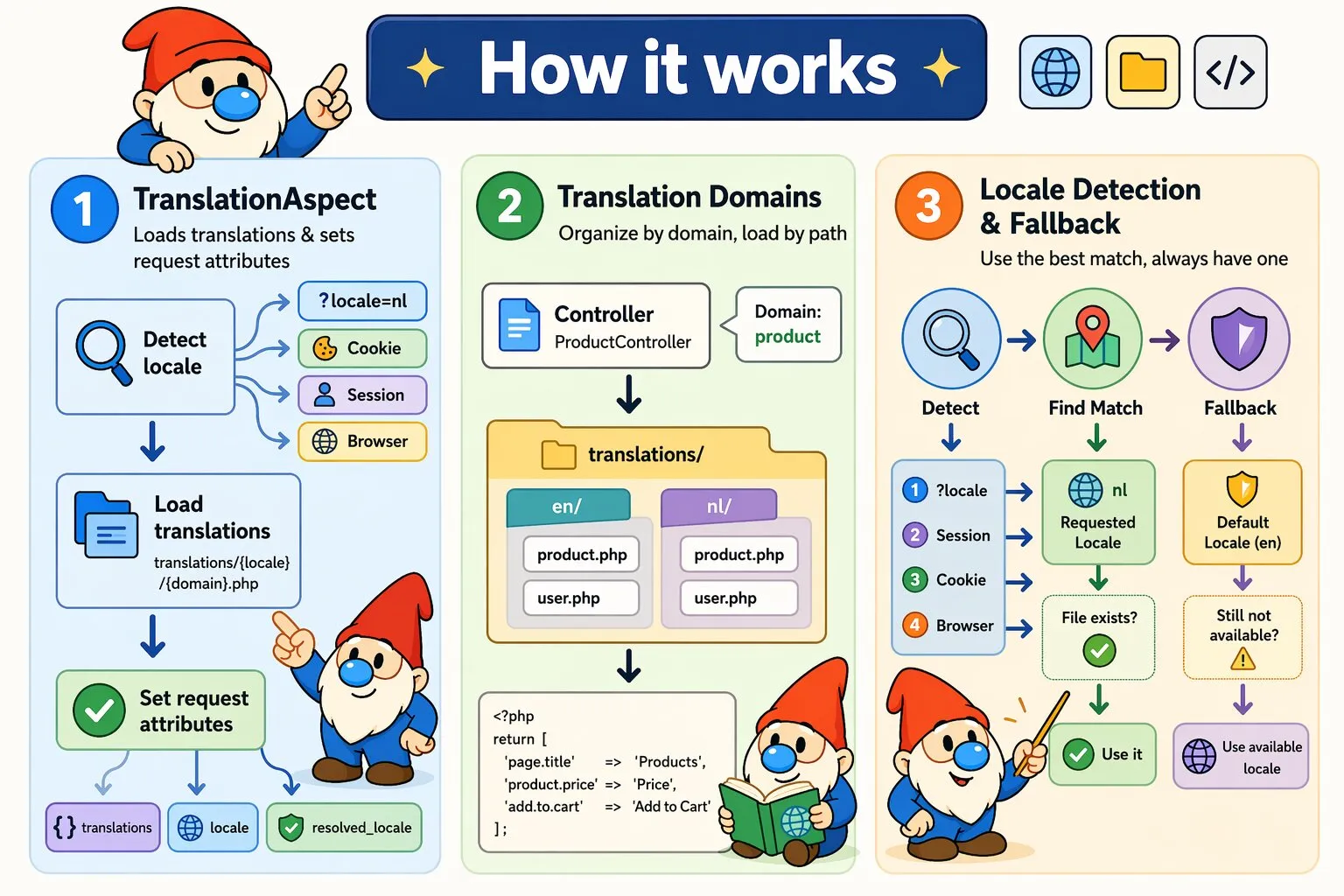
How Translation Works
Canvas's TranslationAspect automatically detects the user's preferred locale, loads the appropriate translation file before your controller executes, and provides translations through request attributes. If a translation file doesn't exist for the requested locale, it falls back to your default locale.
Execution flow:
- Determines user's locale from multiple sources (query parameters, session, cookies, browser headers)
- Determines translation domain from annotation parameter or controller name (e.g.,
UserController→user) - Loads translation file from
translations/{locale}/{domain}.php - Falls back to default locale if requested locale file doesn't exist
- Stores translations, requested locale, and resolved locale in request attributes
Translation File Structure
translations/
├── en/
│   ├── product.php
│   └── user.php
└── nl/
    ├── product.php
    └── user.php
Each translation file must return an associative array:
<?php
// translations/en/product.php
return [
    'page.title' => 'Products',
    'product.price' => 'Price',
    'product.add_to_cart' => 'Add to Cart',
];
Basic Usage
<?php
namespace App\Controllers;

use Quellabs\Canvas\Annotations\Route;
use Quellabs\Canvas\Annotations\InterceptWith;
use Quellabs\Canvas\Translation\TranslationAspect;
use Symfony\Component\HttpFoundation\Request;

class ProductController extends BaseController {

    /**
     * @Route("/products", methods={"GET"})
     * @InterceptWith(TranslationAspect::class, domain="product", defaultLocale="en")
     */
    public function index(Request $request) {
        $translations = $request->attributes->get('translations');
        $locale = $request->attributes->get('locale');
        $resolvedLocale = $request->attributes->get('resolved_locale');

        return $this->render('products/index.tpl', [
            'locale' => $locale,
            'title' => $translations['page.title'] ?? 'Products'
        ]);
    }
}
Configuration Options
Configure the aspect using annotation parameters on your @InterceptWith declaration. Both parameters are optional:
| Parameter | Type | Default | Description |
|---|---|---|---|
domain |
string | "" |
Translation domain - empty derives from controller name |
defaultLocale |
string | "en" |
Fallback locale when requested locale unavailable |
Note: Available locales are automatically discovered by scanning the translations/ directory.
Request Attributes
The TranslationAspect automatically sets these attributes on the request before your controller executes. Access them via $request->attributes->get():
| Attribute | Type | Description |
|---|---|---|
translations |
array | Translation key-value pairs loaded from file. Use this for rendering content. Empty array if no translation file exists. |
locale |
string | Requested/determined locale representing user preference. Use for UI context like date/number formatting. |
resolved_locale |
string | Locale code actually used for loading translations (may differ from locale if fallback occurred). Use for debugging/logging. |
Domain Derivation
Translation domain is automatically derived from controller class name using snake_case:
| Controller Class | Derived Domain |
|---|---|
ProductController |
product |
UserProfileController |
user_profile |
APIController |
api |
Locale Detection
The aspect checks sources in priority order until it finds a valid locale:
| Priority | Source | Description |
|---|---|---|
| 1 | Query Parameter | ?locale=nl - Explicit user choice, highest priority |
| 2 | Session | $_SESSION['locale'] - Persisted preference across requests |
| 3 | Cookie | $_COOKIE['locale'] - Fallback for sessionless persistence |
| 4 | Accept-Language Header | Browser preference, matched against available locales |
| 5 | Default Locale | Configured fallback (if translation file exists) |
| 6 | First Available Locale | First locale found with translation file (if default doesn't exist) |
| 7 | Default Locale (final) | Guaranteed fallback (may return empty translations) |
Important: All locales from sources 1-4 are validated for security (alphanumeric, underscore, hyphen only) and availability (translation file must exist for the domain).
Fallback Mechanism
Canvas implements file-based fallback (not key-based):
- Try
translations/{locale}/{domain}.php - If missing and locale ≠ default, try
translations/{defaultLocale}/{domain}.php - If still missing, return empty array
Important: If a translation file exists but is empty, Canvas returns that empty array. It does NOT fall back to the default locale for individual missing keys.
Template Integration
<h1>{$translations['page.title']|default:'Products'}</h1>

<button>{$translations['product.add_to_cart']|default:'Add to Cart'}</button>

<div class="language-switcher">
    <a href="?locale=en" class="{if $locale == 'en'}active{/if}">English</a>
    <a href="?locale=nl" class="{if $locale == 'nl'}active{/if}">Nederlands</a>
</div>
Caching
TranslationAspect uses two levels of caching:
- Per-request cache: Translation file contents cached for request duration. Cache key:
"{domain}.{locale}". Empty arrays also cached to avoid repeated disk checks. - Static cache: Available locale directories per domain cached statically (shared across all aspect instances). Prevents repeated directory scans.
Cache invalidation for long-running processes:
// Clear all domains (after adding new translation files)
TranslationAspect::clearLocaleCache();

// Clear specific domain only
TranslationAspect::clearLocaleCache('product');
Static cache invalidation is only needed in long-running processes (workers, daemons) when translation files are added or removed at runtime.
Error Handling
| Error | Exception |
|---|---|
| Invalid translation file | RuntimeException: "Translation file must return an array" |
| Controller named just "Controller" | RuntimeException: "Cannot derive domain from controller - class name cannot be just 'Controller'" |
Best Practices
- Organize by domain: Use separate translation files for logical sections (product, checkout, admin) rather than one monolithic file
- Use dot notation: Structure keys hierarchically (
product.price,product.add_to_cart) for better organization - Always provide defaults: Use
??or Smarty's|defaultfilter to handle missing keys gracefully - Keep keys semantic: Use descriptive keys (
checkout.button.complete_order) instead of generic ones (button1) - Test fallback behavior: Verify your application works when translation files are missing or incomplete