 Canvas
Legacy Bridge
Most PHP legacy codebases don't get rewritten — they get inherited. Canvas lets you introduce modern architecture incrementally, without breaking URLs, without a flag day, and without freezing feature development.
Enable Legacy Support
Point Canvas at your existing PHP files and it handles the rest:
// config/app.php
return [
    'legacy_enabled' => true,
    'legacy_path' => dirname(__FILE__) . "/../legacy"
];
From this point, every URL your application currently serves continues to work. Nothing breaks. You now have a foundation to build on.
Route Fallthrough
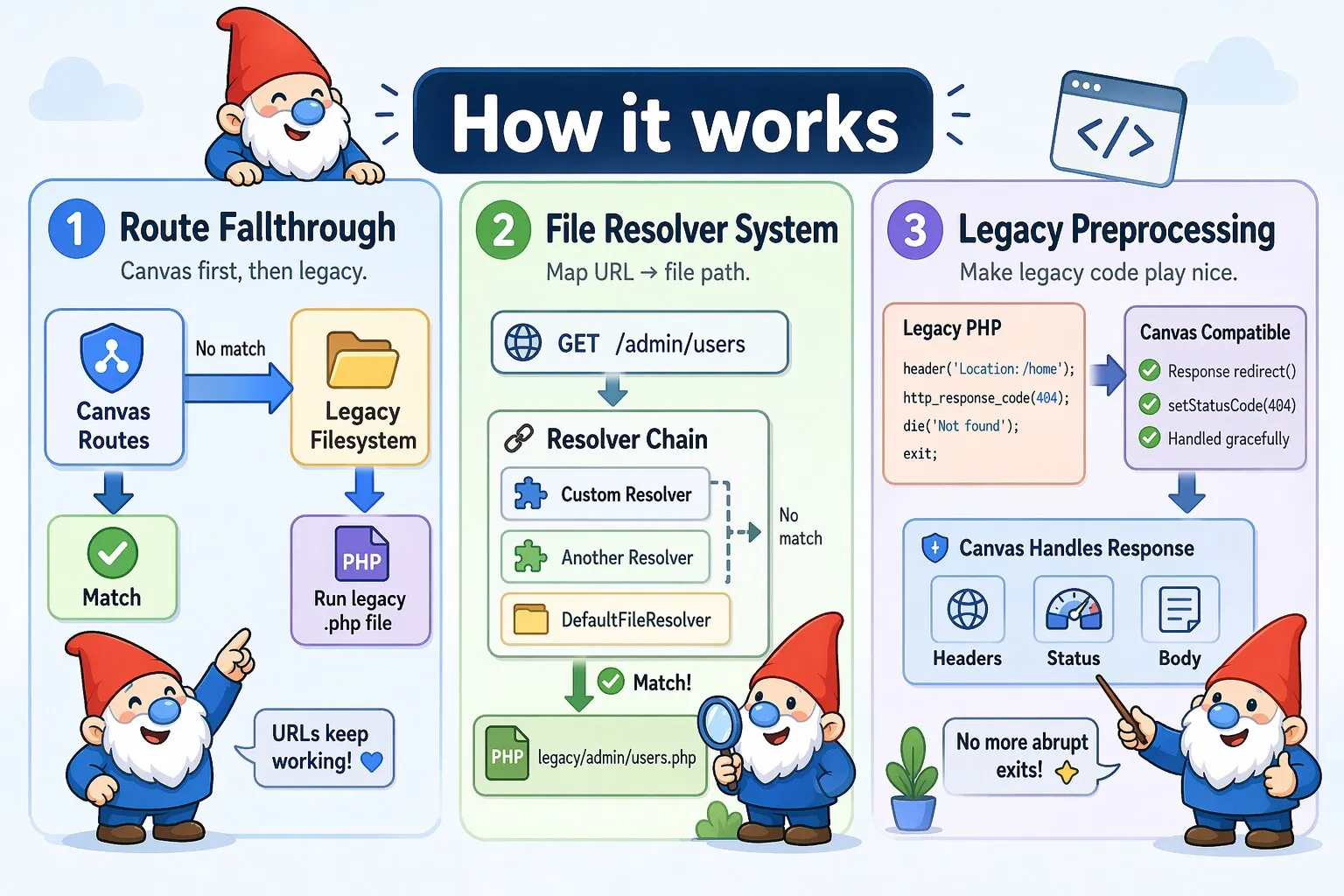
Canvas checks its own routes first. If no Canvas route matches, it falls back to the legacy filesystem:
URL: /admin/users
1. Check Canvas routes → Not found
2. Load legacy/admin/users.php → Executes
3. Canvas services available via canvas() helper
This means you can migrate routes one at a time. Once you create a Canvas controller for a given URL, it takes precedence. The legacy file remains untouched as a fallback until you're ready to remove it.
How Canvas Finds Legacy Files
Canvas uses file resolvers to map URLs to filesystem paths. Resolvers are tried in order; the first one that returns a path wins.
Default File Resolver
The DefaultFileResolver is registered automatically when legacy support is enabled. It handles the most common URL-to-file mapping patterns:
- URL Normalization: Removes leading/trailing slashes
- Direct .php Requests: URLs ending in
.phpmap directly to filesystem paths - Pattern Matching: For all other URLs, tries multiple file patterns in order
For a request to /admin/users, the resolver checks in order:
1. Direct file: legacy/admin/users.php
2. Index file: legacy/admin/users/index.php
The first matching readable file is used. If nothing matches, Canvas returns a 404.
Examples
// Direct file
URL: /admin/dashboard → legacy/admin/dashboard.php

// Directory with index
URL: /admin/users    → legacy/admin/users/index.php

// Explicit .php request
URL: /admin/script.php → legacy/admin/script.php

// Root
URL: /               → legacy/index.php
Custom File Resolvers
Real legacy codebases rarely follow clean conventions. If your application uses non-standard file organization, WordPress-style permalinks, date-based URLs, or other custom URL schemes, implement your own resolver:
// src/Legacy/CustomFileResolver.php
namespace App\Legacy;

use Quellabs\Canvas\Legacy\FileResolverInterface;
use Symfony\Component\HttpFoundation\Request;

class CustomFileResolver implements FileResolverInterface {

    public function __construct(private string $legacyPath) {}

    public function resolve(string $path, Request $request): ?string {
        // Return absolute file path if found, null to pass to next resolver
    }
}
Examples
WordPress-Style Permalinks:
public function resolve(string $path, Request $request): ?string {
    if (str_starts_with($path, '/blog/')) {
        $slug = substr($path, 6);
        return $this->legacyPath . "/wp-content/posts/{$slug}.php";
    }

    return null;
}
Date-Based URLs:
public function resolve(string $path, Request $request): ?string {
    if (preg_match('#^/(\d{4})/(\d{2})/(.+)$#', $path, $matches)) {
        [$_, $year, $month, $slug] = $matches;
        return $this->legacyPath . "/articles/{$year}/{$month}/{$slug}.php";
    }

    return null;
}
Resolver Chain
Register multiple resolvers to handle different parts of your application. Specific resolvers go first; DefaultFileResolver acts as the catch-all:
$handler->addResolver(new WordPressResolver($legacyPath));
$handler->addResolver(new CustomAdminResolver($legacyPath));
$handler->addResolver(new DefaultFileResolver($legacyPath));
Using Canvas Services in Legacy Files
Once the Legacy Bridge is active, your existing PHP files gain access to Canvas services without any structural changes to those files:
// legacy/admin/dashboard.php
use Quellabs\Canvas\Legacy\LegacyBridge;

// Via global helper
$users = canvas('EntityManager')->findBy(User::class, ['active' => true]);

// Via LegacyBridge directly
$em = LegacyBridge::get('EntityManager');
$users = $em->findBy(User::class, ['active' => true]);
This is typically the first thing you'll use. Before migrating a single route, you can start replacing raw SQL queries and procedural logic with Canvas services inside your existing files.
Legacy Preprocessing
Legacy PHP files frequently use header(), die(), and exit() in ways that would short-circuit Canvas's request/response lifecycle. Preprocessing intercepts these calls and converts them to Canvas-compatible equivalents before execution.
Preprocessing is enabled by default:
// config/app.php
return [
    'legacy_enabled'       => true,
    'legacy_path'          => dirname(__FILE__) . "/../legacy",
    'legacy_preprocessing' => true  // Default
];
What Gets Transformed
- Header calls:
header()converts to Canvas header management - Response codes:
http_response_code()converts to Canvas response code management - Exits:
die()andexit()convert to Canvas exceptions
// Original legacy code — works as-is after preprocessing
header('Content-Type: application/json');
http_response_code(201);
echo json_encode(['data' => $data]);
die();
Recursive Preprocessing
Preprocessing follows your file's entire include tree. Canvas discovers all include and require statements, preprocesses each dependency, rewrites include paths to point at preprocessed versions, and caches the results.
// legacy/main.php
header('Content-Type: text/html');  // Converted
include 'includes/helper.php';      // Also preprocessed

// legacy/includes/helper.php
header('Location: /redirect');      // Also converted
die('Stopping execution');          // Also converted
Limitations
Preprocessing works with static include paths. Three edge cases to be aware of:
- Dynamic includes —
include $dynamicPathcannot be detected at preprocessing time. Files included this way will not be preprocessed. If those files containheader()ordie()calls, handle them manually or refactor the dynamic path to be static. - Conditional includes — Files inside conditionals are preprocessed regardless of whether the condition would have prevented execution. This is safe in most cases but worth knowing if you have environment-specific includes.
- Deep include trees — Initial preprocessing of a deeply nested file tree can be slow. Results are cached after the first run.
Disabling Preprocessing
Turn it off if your legacy files don't use header(), die(), or exit(), or when debugging a preprocessing issue:
// config/app.php
return [
    'legacy_enabled'       => true,
    'legacy_path'          => dirname(__FILE__) . "/../legacy",
    'legacy_preprocessing' => false
];
Clearing the Cache
Clear the preprocessing cache after modifying legacy files during development:
// Programmatically
$kernel->getLegacyHandler()->clearCache();

// Via Sculpt
php sculpt legacy:clear-cache
Custom Error Pages
Place error pages in your legacy directory and Canvas will use them automatically:
// legacy/404.php
<!DOCTYPE html>
<html>
<body>
    <h1>404 - Page Not Found</h1>
    <p><a href="/">Return to Homepage</a></p>
</body>
</html>
Canvas looks for 404.php (no matching file) and 500.php (execution failure). If neither exists, Canvas's default error pages are used.
Migration Path
There is no required migration timeline. The four phases below represent a natural progression, but you can stay in any phase as long as needed — or move between them non-linearly as your codebase allows.
Phase 1: Enable Legacy Support
Drop Canvas in as the front controller. Everything continues to work. Start accessing Canvas services from legacy files.
// config/app.php
return [
    'legacy_enabled' => true,
    'legacy_path'    => dirname(__FILE__) . "/../legacy"
];
All existing URLs still work. Canvas services are now available in legacy files:
// legacy/admin/dashboard.php
$users = canvas('EntityManager')->findBy(User::class, ['active' => true]);
Phase 2: Build New Features with Canvas
New functionality goes into Canvas controllers from day one. Legacy code handles everything else.
class ApiController extends BaseController {

    /**
     * @Route("/api/users", methods={"GET"})
     */
    public function users() {
        return $this->json($this->em()->findBy(User::class, []));
    }
}
Phase 3: Migrate Legacy Routes Incrementally
Convert legacy files to Canvas controllers one route at a time. Because Canvas routes take precedence over legacy files, you can migrate a route and keep the legacy file in place until you're confident:
// Before: legacy/admin/users.php
// After: src/Controllers/AdminController.php

/**
 * @Route("/admin/users", methods={"GET"})
 */
public function users() {
    $users = $this->em()->findBy(User::class, ['active' => true]);
    return $this->render('admin/users.tpl', compact('users'));
}
Phase 4: Remove Legacy Support
Once all routes are migrated, disable legacy support entirely:
// config/app.php
return [
    'legacy_enabled' => false
];