 Canvas
Contextual Containers (di)
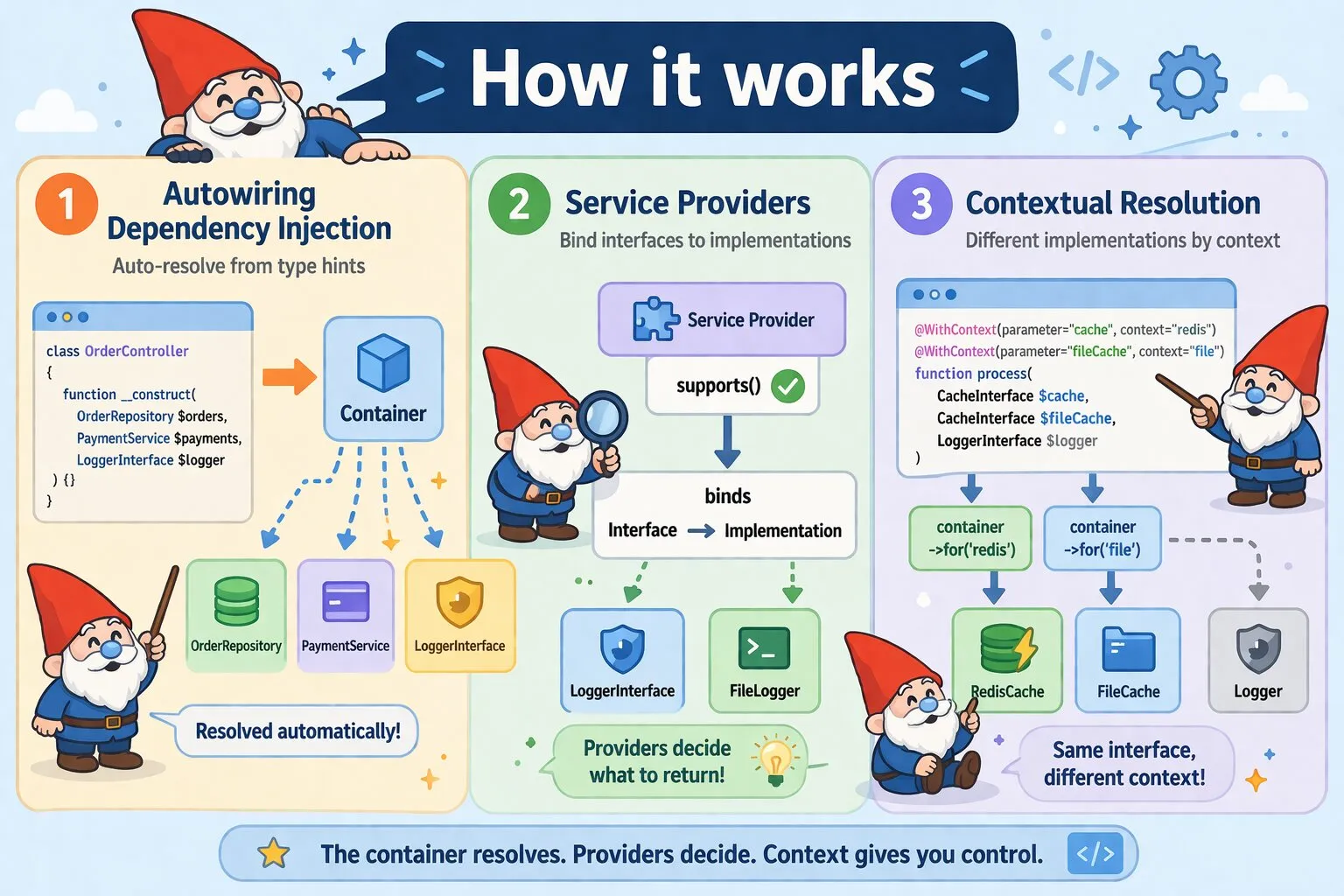
Canvas ships with a fully autowired dependency injection container. Services are
resolved automatically from type hints — no manual binding required for concrete
classes. For interfaces and contextual resolution, service providers and the
@WithContext annotation give you precise control.
Constructor Injection
Any class resolved through the container has its constructor dependencies autowired automatically. Type-hint a concrete class and the container instantiates it, resolving its own dependencies recursively.
class OrderController extends BaseController {

    public function __construct(
        private OrderRepository  $orders,
        private PaymentService   $payments,
        private LoggerInterface  $logger,
    ) {}
}
OrderRepository and PaymentService are instantiated and injected
without any registration. LoggerInterface requires a service provider since
it is an interface — see Service Providers below.
Method Injection
Controller action methods are also autowired. Route parameters are matched by name; typed dependencies are resolved from the container.
class UserController extends BaseController {

    /**
     * @Route("/users/{id}")
     */
    public function show(
        int            $id,         // matched from route variables
        UserRepository $repository, // resolved from container
        CacheInterface $cache,      // resolved via service provider
    ): Response {
        return $cache->remember("user.{$id}", 3600, fn() =>
            $repository->find($id)
        );
    }
}
Contextual Injection via @WithContext
Declare which container context to use for a specific parameter directly in the
method docblock using the @WithContext annotation. This lets you inject
different implementations of the same interface into the same method. Context
resolution is handled automatically — see Contextual Resolution with for()
below for details on how it works under the hood.
/**
 * @WithContext(parameter="cache", context="redis")
 * @WithContext(parameter="fileCache", context="file")
 */
public function process(
    CacheInterface  $cache,      // resolved via $container->for('redis')
    CacheInterface  $fileCache,  // resolved via $container->for('file')
    LoggerInterface $logger,     // resolved normally, no context
): Response {
    // ...
}
The @WithContext annotation supports the following parameters:
| Parameter | Type | Description |
|---|---|---|
parameter |
string | The exact name of the method parameter to apply context to |
context |
string | The context string passed to $container->for() during resolution |
Context is scoped strictly to the annotated parameter — it never bleeds into
adjacent parameters. Parameters without a @WithContext annotation always use
the default container. @WithContext has no effect unless a service provider
is registered whose supports() returns true for the given class and
context combination.
Contextual Resolution with for()
The container supports contextual resolution via for(). A cloned container
scoped to the given context is returned, and service providers can inspect that
context in supports() to return a different implementation.
Pass a string for simple context, or an array for multidimensional context.
A string is automatically converted to ['context' => $context] internally;
arrays are passed through as-is.
// String context — converted to ['context' => 'redis'] internally
$cache = $container->for('redis')->get(CacheInterface::class);

// Array context — passed directly to supports() as $metadata
$primaryDb = $container->for(['driver' => 'mysql', 'role' => 'primary'])
    ->get(DatabaseInterface::class);

$replicaDb = $container->for(['driver' => 'mysql', 'role' => 'replica'])
    ->get(DatabaseInterface::class);
The provider receives the context as the $metadata argument in supports():
public function supports(string $className, array $metadata = []): bool {
    return $className === CacheInterface::class
        && ($metadata['context'] ?? null) === 'redis';
}
Default Singleton Behaviour
When a service is resolved without a matching custom provider, the default provider applies singleton behaviour — the same instance is returned on repeated requests. Custom providers control their own instantiation strategy.
// Default provider — same instance every time
$logger1 = $container->get(LoggerInterface::class);
$logger2 = $container->get(LoggerInterface::class);
// $logger1 === $logger2

// Custom provider — instantiation strategy is up to the provider
$twig1 = $container->for('twig')->get(TemplateEngineInterface::class);
$twig2 = $container->for('twig')->get(TemplateEngineInterface::class);
// May or may not be the same instance
Example: Multiple Implementations of the Same Interface
A common use case is switching template engines per context. Both providers support the same interface; the context string selects which one is used:
class TwigProvider extends ServiceProvider {

    public function supports(string $className, array $metadata = []): bool {
        return $className === TemplateEngineInterface::class
            && ($metadata['context'] ?? 'twig') === 'twig';
    }

    public function createInstance(string $className, array $dependencies, array $metadata): object {
        return new TwigEngine($this->getConfig());
    }
}

class BladeProvider extends ServiceProvider {

    public function supports(string $className, array $metadata = []): bool {
        return $className === TemplateEngineInterface::class
            && ($metadata['context'] ?? null) === 'blade';
    }

    public function createInstance(string $className, array $dependencies, array $metadata): object {
        return new BladeEngine($this->getConfig());
    }
}

// Usage
$twig  = $container->for('twig')->get(TemplateEngineInterface::class);
$blade = $container->for('blade')->get(TemplateEngineInterface::class);

$twig->render('page.html.twig', ['title' => 'Welcome']);
$blade->render('page.blade.php', ['title' => 'Welcome']);
Resolving from the Container Directly
When you need to resolve a service imperatively, inject the container itself
and call get():
public function __construct(private ContainerInterface $container) {}

public function handle(): void {
    // Resolve with default container
    $logger = $this->container->get(LoggerInterface::class);

    // Resolve with context
    $cache  = $this->container->for('redis')->get(CacheInterface::class);

    // Instantiate without service providers (concrete classes only)
    $mailer = $this->container->make(SmtpMailer::class);
}| Method | Description |
|---|---|
get($class) |
Resolve a class or interface, running through service providers |
make($class) |
Instantiate a concrete class directly, bypassing service providers |
has($class) |
Check whether the container can resolve a given class or interface |
for($context) |
Return a cloned container scoped to the given context string |
invoke($instance, $method) |
Call a method on an existing instance with autowired arguments |
register($provider) |
Register a service provider at runtime |
unregister($provider) |
Remove a previously registered service provider |
Service Providers
Service providers bind interfaces to implementations and handle any initialization logic the container cannot infer automatically. Providers are discovered via Composer metadata — no manual registration in the kernel.
class LoggerProvider extends ServiceProvider {

    public function supports(string $className, array $metadata = []): bool {
        return $className === LoggerInterface::class;
    }

    public function createInstance(
        string $className,
        array  $dependencies,
        array  $metadata,
    ): object {
        return new FileLogger('/var/log/canvas.log');
    }
}
Register providers in composer.json under the di family. Canvas scans
this at boot — the name di is required and cannot be changed.
{
  "extra": {
    "discover": {
      "di": {
        "providers": [
          "App\\Providers\\TwigProvider",
          "App\\Providers\\BladeProvider"
        ]
      }
    }
  }
}
Providers can optionally declare a configuration file. Discover loads it
automatically and makes it available via $this->getConfig() inside the provider:
{
  "extra": {
    "discover": {
      "di": {
        "providers": [
          {
            "class": "App\\Providers\\TwigProvider",
            "config": "config/twig.php"
          }
        ]
      }
    }
  }
}
Configuration files return a plain array:
// config/twig.php
return [
    'cache_path' => '/tmp/twig',
    'debug'      => false,
];
For any configuration file you can create a corresponding .local.php file
that Discover loads and merges on top of the base configuration. Only the keys
you specify are overridden — the rest are kept from the base file. This is
useful for keeping environment-specific settings out of version control:
// config/twig.local.php
return [
    'debug' => true, // overrides false from twig.php
];
The MethodContext Object
During autowiring, the container passes a MethodContextInterface object
through the resolution chain. Service providers receive it as the final argument
of createInstance() and can use it to make resolution decisions based on
where and how a dependency is being injected.
Available Methods
getClassName(): string— The fully qualified name of the class being constructedgetMethodName(): string— The method whose parameters are being resolved (__constructfor constructor injection)getArguments(): array— Arguments already resolved for this method callgetCurrentParameterName(): ?string— The name of the parameter currently being resolved
getCurrentParameterName() is particularly useful when a provider needs to
behave differently depending on which parameter it is satisfying — for example,
a logger provider that derives the channel name from the parameter name:
class LoggerProvider extends ServiceProvider {

    public function supports(string $className, array $metadata = []): bool {
        return $className === LoggerInterface::class;
    }

    public function createInstance(
        string $className,
        array  $dependencies,
        array  $metadata,
        ?MethodContextInterface $methodContext = null,
    ): object {
        // Use the parameter name as the logger channel when no explicit channel is set
        $channel = $metadata['channel']
            ?? $methodContext?->getCurrentParameterName()
            ?? 'app';

        return new Logger($channel);
    }
}
Injecting MethodContext into Services
Services can declare MethodContextInterface as a constructor dependency.
During a request cycle the container injects the live context object, giving the
service access to the class and method that triggered its resolution.
Outside a request cycle (console commands, tests) the injected value is
null, so declare the parameter nullable and guard accordingly.
use Quellabs\Contracts\Context\MethodContextInterface;

class AuditService {
    public function __construct(
        private ?MethodContextInterface $context = null
    ) {}

    public function record(string $event): void {
        $this->logger->info($event, [
            'controller' => $this->context?->getClassName(),
            'method'     => $this->context?->getMethodName(),
        ]);
    }
}
When injected into a controller method parameter, the context reflects the
controller class and action method. When injected into a constructor dependency,
it reflects the class being constructed and __construct as the method name.
Inside a request cycle the injected instance is actually the Canvas
MethodContextInterface extension, which additionally exposes
getClass(), getRequest(), and setRequest(). Cast to
\Quellabs\Canvas\Routing\Contracts\MethodContextInterface if you need
those — see the AOP page for the full interface.
Circular Dependency Detection
The container tracks the resolution stack and throws a descriptive
RuntimeException when a circular dependency is detected, showing the full
chain:
RuntimeException: Circular dependency detected: ServiceA -> ServiceB -> ServiceA