 Canvas
Input Validation
Last updated: 2026-10-30
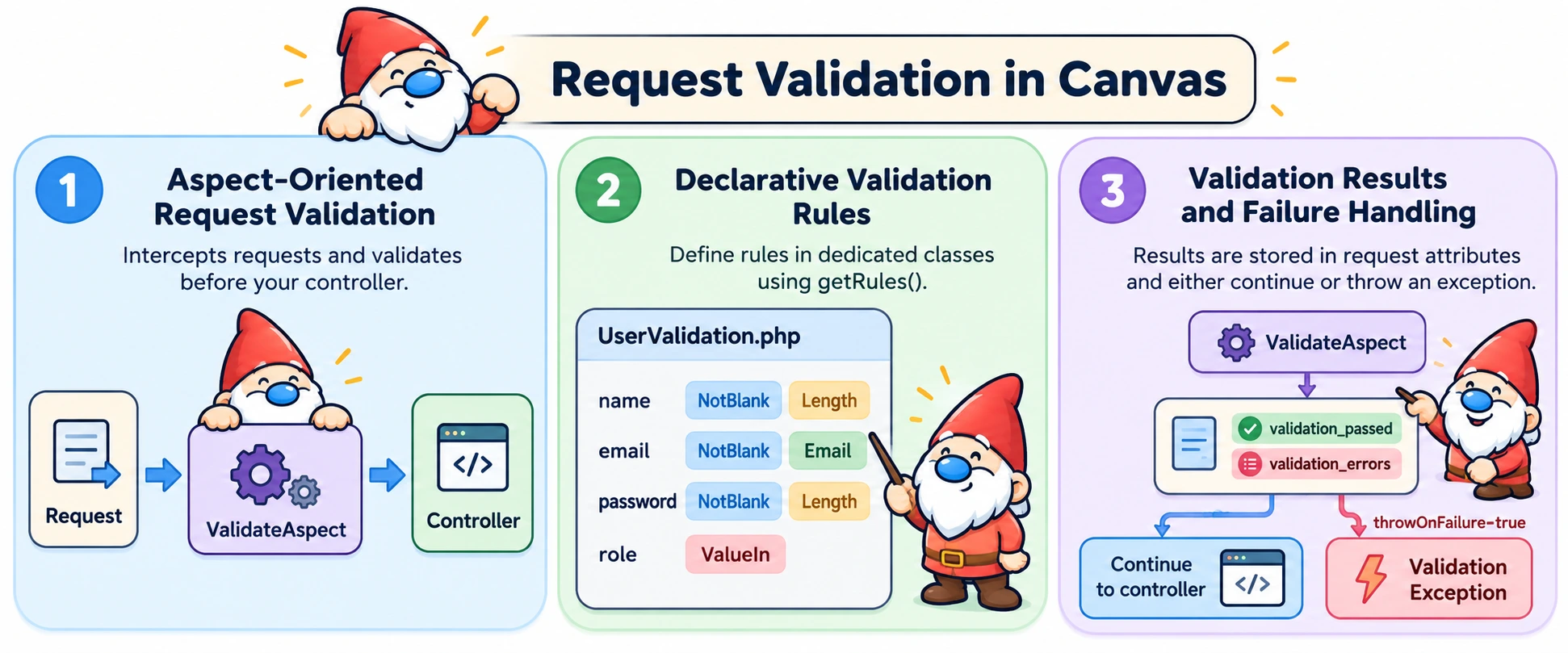
Canvas provides a validation system that separates validation logic from controllers using the @InterceptWith annotation with ValidateAspect. For eligible requests, the aspect validates input before the controller method runs. It records the result on the request and can optionally throw a ValidationException on failure.
How ValidateAspect Works
When a request hits a route with @InterceptWith(ValidateAspect::class):
- The aspect instantiates your validation class
- Retrieves validation rules by calling
getRules() - Runs each rule against the corresponding request data
- Sets
validation_passedandvalidation_errorsrequest attributes after validation, regardless of outcome. With aformId, their names are prefixed by that ID. - If validation failed and
throwOnFailure=true: throws aValidationExceptioninstead of continuing to the controller - Otherwise: continues to your controller, whether validation passed or failed
The aspect runs only on POST, PUT, PATCH, or DELETE requests containing form or query data. It merges those fields with form data taking precedence; it does not read JSON bodies or uploaded files. For other inputs, call Validator directly.
Creating Validation Classes
Define validation rules in dedicated classes that implement ValidationInterface:
<?php
namespace App\Validation;

use Quellabs\Canvas\Validation\Contracts\ValidationInterface;
use Quellabs\Canvas\Validation\Rules\NotBlank;
use Quellabs\Canvas\Validation\Rules\Email;
use Quellabs\Canvas\Validation\Rules\Length;
use Quellabs\Canvas\Validation\Rules\ValueIn;

class UserValidation implements ValidationInterface {

    public function getRules(): array {
        return [
            'name' => [
                new NotBlank('Name is required'),
                new Length(min: 2, message: 'Name must be at least {{min}} characters')
            ],
            'email' => [
                new NotBlank('Email is required'),
                new Email('Please enter a valid email address')
            ],
            'password' => [
                new NotBlank('Password is required'),
                new Length(min: 8, message: 'Password must be at least {{min}} characters')
            ],
            'role' => [
                new ValueIn(['admin', 'user', 'moderator'], 'Please select a valid role')
            ]
        ];
    }
}
Available Validation Rules
Rules live in Quellabs\Canvas\Validation\Rules. Each field maps to one rule or an array of rules. Validator::validate() returns an array of messages keyed by field; an empty array means validation passed. Use NotBlank for required text fields: most format and length rules allow an empty value.
Basic Rules
// In your validation class getRules() method:

// Required fields
'name' => [new NotBlank('Name is required')],

// Length constraints
'description' => [new Length(min: 10, max: 500, message: 'Must be between {{min}} and {{max}} characters')],

// Type checking
'age' => [new Type('integer', 'Must be a number')],

// Allowed values
'category' => [new ValueIn(['option1', 'option2'], 'Must be a valid option')],

// At least one condition must match the same field value
'contact' => [new AtLeastOneOf(conditions: [new Email(), new PhoneNumber()], message: 'Enter an email address or phone number')]
AtLeastOneOf accepts rule objects and tests them against one field value. It does not check whether one of several named fields is present.
Format Validation
// Email validation
'email' => [new Email('Please enter a valid email address')],

// Phone number validation
'phone' => [new PhoneNumber('Please enter a valid phone number')],

// Date format validation
'birthdate' => [new Date(message: 'Please enter a valid date')],

// Regular expression matching
'username' => [new RegExp('/^[a-zA-Z0-9_]+$/', 'Only letters, numbers, and underscores')]
Security Rules
// Prevent HTML injection
'comment' => [
    new NotHTML('HTML tags are not allowed'),
    new NotLongWord(length: 50, message: 'Words cannot exceed {{length}} characters')
]
File Upload Validation
The built-in validation rule namespace does not contain FileRequired, FileSize, or FileType. For upload checks, see Secure File Upload. ValidateAspect validates merged request and query fields; it does not include uploaded files.
Failure Modes
When validation fails, ValidateAspect always writes the result to request attributes first. What happens next depends on whether throwOnFailure is enabled.
Default Behavior (HTML Form Validation)
For traditional server-rendered forms, validation failures pass control to your controller so you can re-render the form with errors:
<?php
namespace App\Controllers;

use Quellabs\Canvas\Annotations\Route;
use Quellabs\Canvas\Annotations\InterceptWith;
use Quellabs\Canvas\Validation\ValidateAspect;
use App\Validation\UserValidation;
use Symfony\Component\HttpFoundation\Request;

class UserController extends BaseController {

    /**
     * @Route("/users/create", methods={"GET", "POST"})
     * @InterceptWith(ValidateAspect::class, validator=UserValidation::class)
     */
    public function create(Request $request) {
        if ($request->isMethod('POST')) {
            // ValidateAspect has already run validation
            if ($request->attributes->get('validation_passed', false)) {
                // Validation passed - process the form
                $user = new User();
                $user->setName($request->request->get('name'));
                $user->setEmail($request->request->get('email'));

                $this->em()->persist($user);
                $this->em()->flush();

                return $this->redirect('/users');
            }

            // Validation failed - re-render form with errors
            return $this->render('users/create.tpl', [
                'errors' => $request->attributes->get('validation_errors', []),
                'old'    => $request->request->all()
            ]);
        }

        // GET request - show empty form
        return $this->render('users/create.tpl');
    }
}
Exception Mode
Use throwOnFailure=true to throw a ValidationException when validation fails. Your controller method never executes — Canvas's exception handling takes over:
/**
 * @Route("/api/users", methods={"POST"})
 * @InterceptWith(ValidateAspect::class, validator=UserValidation::class, throwOnFailure=true)
 */
public function createUser(Request $request) {
    // Only reached when validation passed
    $user = $this->createUserFromRequest($request);
    return $this->json(['success' => true, 'user_id' => $user->getId()]);
}
The thrown ValidationException carries the per-field errors and the formId passed to the aspect, if any:
use Quellabs\Canvas\Exceptions\ValidationException;

// In your exception handler:
if ($e instanceof ValidationException) {
    $errors = $e->getErrors();   // ['email' => ['Please enter a valid email address'], ...]
    $formId = $e->getFormId();   // The formId passed to the aspect, or null
}
Canvas's DefaultErrorHandler renders a generic HTML error page for ValidationException, the same as for any other exception — it has no special knowledge of getErrors(). For a JSON error response, write a custom ErrorHandlerInterface handler:
namespace App\Errors;

use Quellabs\Canvas\Error\ErrorHandlerInterface;
use Quellabs\Canvas\Exceptions\ValidationException;
use Symfony\Component\HttpFoundation\Request;
use Symfony\Component\HttpFoundation\Response;

class ValidationExceptionHandler implements ErrorHandlerInterface {
    public static function supports(\Throwable $e): bool {
        return $e instanceof ValidationException;
    }

    public function handle(\Throwable $e, Request $request): Response {
        return new Response(json_encode([
            'message' => $e->getMessage(),
            'errors'  => $e->getErrors(),
        ]), 422, ['Content-Type' => 'application/json']);
    }
}
When to use exception mode:
- API endpoints where clients handle HTTP error codes programmatically
- When you have a central exception handler that already formats error responses consistently
- Situations where you want to guarantee the controller never runs when validation fails
Standalone Validation (Without AOP)
The Validator class can be used independently of the ValidateAspect to validate any array of data. This is useful when:
- Validating data in service layers or business logic
- Processing batch imports (CSV, JSON files)
- Validating data from non-HTTP sources (message queues, CLI commands)
- Testing validation rules directly
- Building custom validation flows
Basic Usage
<?php
use Quellabs\Canvas\Validation\Validator;
use App\Validation\UserValidation;

// Create validator instance
$validator = new Validator();

// Data to validate (from any source)
$data = [
    'name' => 'John Doe',
    'email' => 'john@example.com',
    'password' => 'secret123'
];

// Create validation rules instance
$rules = new UserValidation();

// Validate the data
$errors = $validator->validate($data, $rules);

if (empty($errors)) {
    // Validation passed - process the data
    $this->createUser($data);
} else {
    // Validation failed - handle errors
    // $errors = ['email' => ['Please enter a valid email address']]
}
Custom Validation Rules
Implement ValidationRuleInterface with validate(mixed $value): bool and getError(): string. The validator calls getError() when validate() returns false. Pass rule configuration through the constructor.
<?php
namespace App\Validation\Rules;

use Quellabs\Canvas\Validation\Contracts\ValidationRuleInterface;

class StrongPassword implements ValidationRuleInterface {

    public function validate(mixed $value): bool {
        if (!is_string($value)) {
            return false;
        }

        // Require uppercase, lowercase, number, and special character
        return preg_match('/^(?=.*[a-z])(?=.*[A-Z])(?=.*\d)(?=.*[@$!%*?&])[A-Za-z\d@$!%*?&]+$/', $value) === 1;
    }

    public function getError(): string {
        return 'Password must contain uppercase, lowercase, number, and special character';
    }
}
Validation by Use Case
For different create and update requirements, define separate classes such as UserCreateValidation and UserUpdateValidation, then select the class with the annotation's validator argument on each route. ValidateAspect accepts validator, formId, and throwOnFailure; it does not pass arbitrary annotation arguments to the validation class constructor.
Best Practices
- One validator per use case: Create separate validation classes for different operations (UserCreateValidation vs. UserUpdateValidation)
- User-friendly messages: Write error messages users can understand and act on, avoid technical jargon
- Efficient rule ordering: Place cheap checks (NotBlank, Length) before expensive operations (database queries, API calls)
- Separate validation from sanitization: Use SanitizeAspect to clean data, ValidateAspect to verify it
- Reusable custom rules: Extract common validation logic into custom rule classes that can be used across validators
- Empty value handling: Let NotBlank handle empty values, skip validation in other rules when value is empty
Frequently Asked Questions
Does ValidateAspect run on every request, including GET?
No. It only validates POST, PUT, PATCH, or DELETE requests, and only when there's actual $_POST or $_GET data present — a plain GET request to show an empty form skips validation entirely rather than running rules against nothing.
Does ValidateAspect ever build a response itself?
No. It only ever does one of two things: write validation_passed/validation_errors to the request attributes, or — when throwOnFailure=true and validation fails — throw a ValidationException. Building the actual error response (JSON, HTML, or otherwise) is left entirely to your controller or to Canvas's error handling.
Does ValidateAspect validate JSON request bodies?
No. It only reads and merges $_POST and $_GET data — it never parses the raw request body. If your API accepts a JSON payload rather than form-encoded fields, decode and validate it yourself; ValidateAspect won't see that data at all.
How do I validate more than one form on the same page without their results colliding?
Pass a formId parameter to @InterceptWith(ValidateAspect::class, ...) — it prefixes the request attributes, so formId="signup" sets signup_validation_passed and signup_validation_errors instead of the unprefixed names, keeping multiple forms' results independent. When throwOnFailure=true is also set, the same formId is available from the thrown exception via $e->getFormId().
With throwOnFailure=true, what does the resulting error response actually look like?
Whatever Canvas's error handling produces for a ValidationException. With no custom handler registered, that's DefaultErrorHandler's generic 422 HTML page — it doesn't know about getErrors(). For a JSON body with per-field errors, register your own ErrorHandlerInterface handler that supports ValidationException and reads getErrors()/getFormId() yourself.