 Canvas
Authentication
The canvas-authorization package provides a complete authentication scaffold for Canvas applications. A single CLI command installs login, registration, and route protection — configured for your template engine automatically.
Installation
Add the package to your project:
composer require quellabs/canvas-authorizationRun the installer via Sculpt:
php vendor/bin/sculpt install:authThe installer copies the following files into your project:
- src/Controllers/AuthenticationController.php — Login, logout, and registration routes
- src/Aspects/AuthenticationAspect.php — AOP interceptor for protecting routes
- src/Validation/LoginFormValidator.php — Server-side login validation
- src/Validation/RegistrationFormValidator.php — Server-side registration validation
- src/Entities/UserEntity.php — ORM entity representing a user
- src/Exceptions/UserCreationException.php — Typed exception for registration failures
- templates/login.{ext} — Login form template
- templates/registration_form.{ext} — Registration form template
Once installed, the files are yours to modify. The package makes no assumptions about your application's design or business logic beyond the initial scaffold.
Template Engine Detection
The installer reads config/app.php and copies the correct template stubs for your configured engine:
- Smarty —
login.tpl,registration_form.tpl - Blade —
login.blade.php,registration_form.blade.php - Latte —
login.latte,registration_form.latte - Twig —
login.twig,registration_form.twig
Options
Pass --force to overwrite existing files without being prompted:
php vendor/bin/sculpt install:auth --forceDatabase Setup
After installation, generate and run the migration to create the users table:
php vendor/bin/sculpt make:migrations
php vendor/bin/sculpt quel:migrate
How Authentication Works
Login Flow
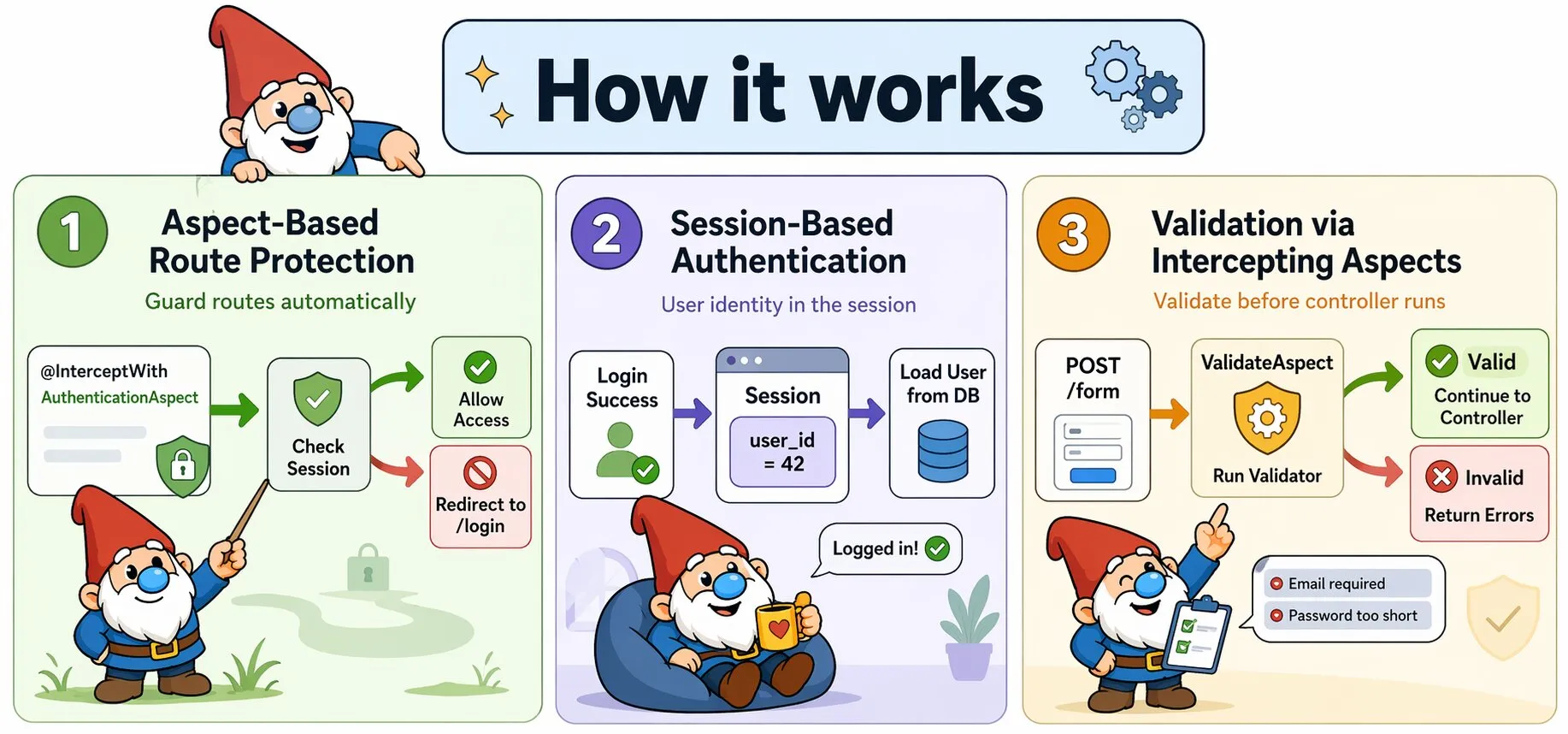
The AuthenticationController handles the full login lifecycle:
- A
GET /loginrequest renders the login form - A
POST /loginsubmission is intercepted byValidateAspect, which runsLoginFormValidator - If validation fails, the form is re-rendered with field-level errors
- If validation passes, the username and password are checked against the database
- On success, the user ID is stored in the session and the user is redirected to
/ - On failure, the form is re-rendered with a generic error to avoid revealing whether the username or password was wrong
/**
 * Process login form submission
 * @Route("/login", methods={"POST"})
 * @InterceptWith(Quellabs\Canvas\Validation\ValidateAspect::class, validator=App\Validation\LoginFormValidator::class)
 */
public function processLogin(Request $request): Response {
    if (!$request->attributes->get('validation_passed', true)) {
        return $this->render('login.tpl', ['errors' => $request->attributes->get('validation_errors', [])]);
    }

    $username = $request->request->get('username');
    $password = $request->request->get('password');
    $user = $this->findUser($username);

    if (!$user || !$this->checkPassword($password, $user)) {
        return $this->render('login.tpl', ['errors' => ['general' => ['Invalid username or password.']]]);
    }

    $request->getSession()->set('user_id', $user->getId());
    return new RedirectResponse('/');
}
Registration Flow
Registration follows the same pattern as login:
- A
GET /registerrequest renders the registration form - A
POST /registersubmission is intercepted byValidateAspectwithRegistrationFormValidator - Server-side password confirmation is checked after validation
- If the username is already taken, the form is re-rendered with an error
- On success, the new user is persisted, logged in automatically, and redirected to
/
Session Management
Authentication state is stored in the session using a single key. Session handling is provided by Symfony HttpFoundation — Canvas uses its defaults without wrapping or extending the session layer:
// Login — store user identity
$request->getSession()->set('user_id', $user->getId());

// Logout — clear all session data
$request->getSession()->clear();
Protecting Routes
Apply @InterceptWith to any controller or method you want to protect. AuthenticationAspect checks for a valid session and redirects unauthenticated users to the login page.
Protecting an Entire Controller
/**
 * @InterceptWith(App\Aspects\AuthenticationAspect::class)
 */
class DashboardController extends BaseController {

    /**
     * @Route("/dashboard", methods={"GET"})
     */
    public function index(): Response {
        return $this->render('dashboard.tpl');
    }
}
Protecting Individual Methods
class AccountController extends BaseController {

    /**
     * @Route("/account", methods={"GET"})
     * @InterceptWith(App\Aspects\AuthenticationAspect::class)
     */
    public function settings(): Response {
        return $this->render('account/settings.tpl');
    }
}
When placed on the class, all methods in that controller are protected. When placed on a method, only that route requires authentication.
Accessing the Authenticated User
The user ID stored in the session can be used to load the current user from the database:
public function index(Request $request): Response {
    $userId = $request->getSession()->get('user_id');
    $user = $this->em()->find(UserEntity::class, $userId);

    return $this->render('dashboard.tpl', ['user' => $user]);
}
Customisation
All installed files are standard Canvas classes with no dependency on the canvas-authorization package at runtime. You are free to modify them as needed:
- UserEntity — Add fields such as
email,created_at, orrole - AuthenticationAspect — Change the redirect target or add role-based checks
- LoginFormValidator — Adjust validation rules to match your requirements
- Templates — Restyle to match your application's design
File Conflicts
If any of the target files already exist, the installer prompts before overwriting each one. Pass --force to skip prompts and overwrite all files unconditionally.
File already exists: src/Controllers/AuthenticationController.php. Overwrite? [y/N]Summary
Canvas authentication is designed to get you started quickly without locking you in:
- One Command —
install:authscaffolds everything needed for login and registration - Engine Aware — Templates copied for your configured engine automatically
- AOP Protection — Routes protected declaratively with
@InterceptWith, no base class required - Fully Owned — Installed files have no runtime dependency on the package; modify freely
- Validation Integrated — Form validation handled via existing Canvas validation infrastructure