 Canvas
JWT Authentication
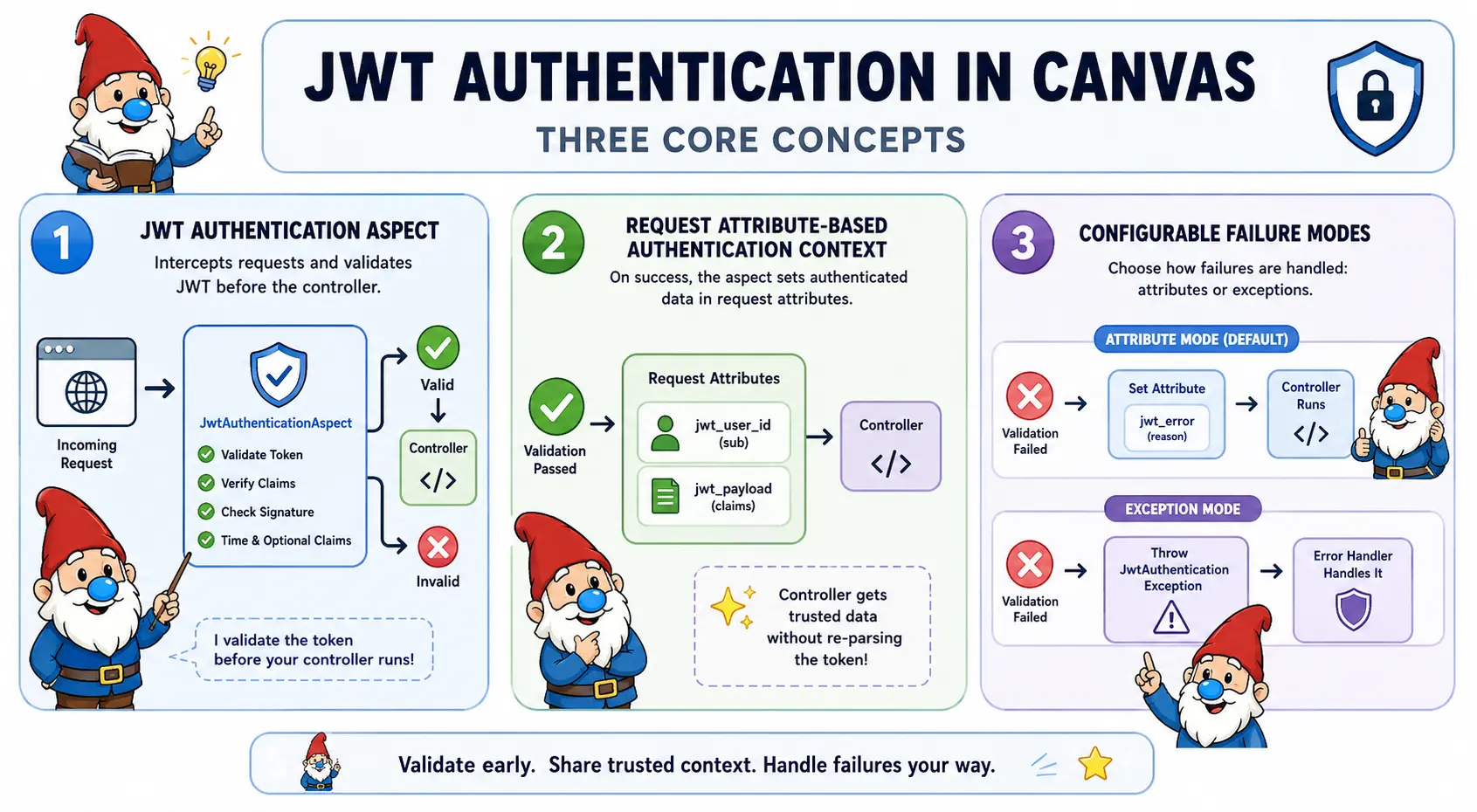
Canvas provides a JWT authentication system that separates token validation from controllers using the @InterceptWith annotation with JwtAuthenticationAspect. The aspect intercepts requests before they reach your controller method, validates the Bearer token, and either passes control to your controller or handles the authentication failure.
Quick Start
Add @InterceptWith(JwtAuthenticationAspect::class) to any route that requires authentication. The aspect validates the Bearer token before your controller runs and writes the JWT claims to request attributes:
<?php
namespace App\Controllers;

use Quellabs\Canvas\Annotations\Route;
use Quellabs\Canvas\Annotations\InterceptWith;
use Quellabs\Canvas\Security\JwtAuthenticationAspect;
use Symfony\Component\HttpFoundation\Request;

class UserController extends BaseController {

    /**
     * @Route("/api/profile", methods={"GET"})
     * @InterceptWith(JwtAuthenticationAspect::class)
     */
    public function profile(Request $request) {
        if ($request->attributes->get('jwt_error')) {
            return $this->json(['error' => $request->attributes->get('jwt_error')], 401);
        }

        $userId = $request->attributes->get('jwt_user_id');
        $claims = $request->attributes->get('jwt_payload');

        $user = $this->em()->find(UserEntity::class, $userId);
        return $this->json(['user' => $user]);
    }
}
On a valid token, jwt_user_id and jwt_payload are set on the request. In the default attribute mode, jwt_error is set on failure and your controller still runs — giving you full control over the response.
This example uses attribute mode, which works without any additional setup. For production APIs with many protected endpoints, most applications prefer exception mode with a JSON error handler — it removes the per-controller auth check entirely.
Setup
Run the following Sculpt command to generate config/jwt.php with default settings:
php sculpt jwt:initThis creates config/jwt.php in your project. The aspect loads this file automatically — you do not need to modify config/app.php. If the file already exists the command does nothing; use --force to overwrite it.
The secret must be set in config/jwt.local.php, which should not be committed to source control. After running the command:
- Add
config/jwt.local.phpto your.gitignore - Create
config/jwt.local.phpand set the secret to a strong random value
// config/jwt.local.php — not committed to source control
return [
    'secret' => 'your-actual-secret',
];
The generated config/jwt.php looks like this — edit it to suit your application:
// config/jwt.php
return [
    'secret'           => '',     // set the real value in config/jwt.local.php
    'algorithm'        => 'HS256',
    'throw_on_failure' => false,
    'clock_skew'       => 30,     // seconds of clock skew tolerance for exp and nbf
    'issuer'           => '',     // optional, leave empty to skip validation
    'audience'         => '',     // optional, leave empty to skip validation
];
If the secret is empty, the aspect throws a \RuntimeException at startup so misconfiguration is caught before any request is served.
Recommended Production Setup
For most APIs, the following configuration covers all the bases:
- Store the secret in
config/jwt.local.php, excluded from source control - Set
throw_on_failure = trueand register a JSON error handler — this keeps controllers clean - Configure
issuerandaudienceif multiple services share the same secret - Keep JWTs short-lived and rely on
expfor revocation
// config/jwt.php — recommended production values
return [
    'secret'           => '',                  // set in config/jwt.local.php
    'algorithm'        => 'HS256',
    'throw_on_failure' => true,
    'clock_skew'       => 30,
    'issuer'           => 'auth.example.com',  // leave empty to skip validation
    'audience'         => 'api.example.com',   // leave empty to skip validation
];
With throw_on_failure = true, your controllers contain no auth checks — they only run when the token is valid. See Handling Authentication Failures for how to register a JSON error handler.
Failure Modes
JwtAuthenticationAspect can operate in two modes. Pick the one that suits your API:
| Attribute mode (default) | Exception mode (throwOnFailure=true) |
|
|---|---|---|
| On failure | Sets jwt_error on request attributes; controller still executes |
Throws JwtAuthenticationException; controller never executes |
| Error response | Controller decides format and status code | Handled by your registered ErrorHandlerInterface |
| Requires error handler | No | Yes — the default Canvas handler returns HTML |
| Best for | Custom error formatting, optional auth, mixed endpoints | Uniform 401 handling across many endpoints |
Request Attributes
The aspect writes the following attributes to the request object:
| Attribute | Type | Available when |
|---|---|---|
jwt_user_id |
string|null |
Token valid (null if token has no sub claim) |
jwt_payload |
array |
Token valid |
jwt_error |
string |
Validation failed in attribute mode |
In attribute mode, always check for jwt_error before reading jwt_payload — the payload will not be set if validation failed.
Reading claims in a controller:
public function someEndpoint(Request $request) {
    // The 'sub' claim from the token, or null if the token had no 'sub'
    $userId = $request->attributes->get('jwt_user_id');

    // The full decoded claims array
    $claims = $request->attributes->get('jwt_payload');

    // Example: read custom claims
    $role   = $claims['role']   ?? 'guest';
    $scopes = $claims['scopes'] ?? [];
}
Handling Authentication Failures
Attribute Mode
In attribute mode (the default), the controller always executes and checks jwt_error itself:
/**
 * @Route("/api/profile", methods={"GET"})
 * @InterceptWith(JwtAuthenticationAspect::class)
 */
public function profile(Request $request) {
    if ($request->attributes->get('jwt_error')) {
        return $this->json([
            'error' => $request->attributes->get('jwt_error')
        ], 401);
    }

    $userId = $request->attributes->get('jwt_user_id');
    $user   = $this->em()->find(UserEntity::class, $userId);
    return $this->json(['user' => $user]);
}
Exception Mode
Set throw_on_failure = true in config/jwt.php (or throwOnFailure=true in the annotation) to throw JwtAuthenticationException on failure. Your controller method only executes when the token is valid, which removes the per-method auth check. This requires a registered ErrorHandlerInterface to produce a proper JSON response — the default Canvas error handler returns HTML:
/**
 * @Route("/api/orders", methods={"GET"})
 * @InterceptWith(JwtAuthenticationAspect::class)
 */
public function listOrders(Request $request) {
    // If this code executes, the token has already been validated.
    $userId = $request->attributes->get('jwt_user_id');
    $orders = $this->em()->findBy(OrderEntity::class, ['user_id' => $userId]);
    return $this->json(['orders' => $orders]);
}
Register a custom error handler to produce a JSON 401 response:
<?php
namespace App\Errors;

use Quellabs\Canvas\Error\ErrorHandlerInterface;
use Quellabs\Canvas\Exceptions\JwtAuthenticationException;
use Symfony\Component\HttpFoundation\JsonResponse;
use Symfony\Component\HttpFoundation\Request;
use Symfony\Component\HttpFoundation\Response;

class JwtErrorHandler implements ErrorHandlerInterface {

    public static function supports(\Throwable $e): bool {
        return $e instanceof JwtAuthenticationException;
    }

    public function handle(\Throwable $e, Request $request): Response {
        return new JsonResponse(['error' => $e->getMessage()], 401);
    }
}
The exception message contains the specific failure reason (JWT has expired, Invalid JWT signature, etc.). The example above surfaces this directly to the client, which is useful during development. In production, prefer returning a generic message and logging the detail internally:
public function handle(\Throwable $e, Request $request): Response {
    // Log the specific reason internally; return a generic message to the client
    $this->logger->warning('JWT authentication failed', ['reason' => $e->getMessage()]);

    return new JsonResponse(['error' => 'Invalid authentication token'], 401);
}
Troubleshooting
| Error | Cause |
|---|---|
JWT has expired |
The exp claim is in the past. Increase clock_skew tolerance for minor time drift, or issue a fresh token. |
Invalid JWT signature |
The token was signed with a different secret than the one in config/jwt.local.php. |
Missing Authorization header |
No Authorization: Bearer <token> header was sent with the request. |
Invalid audience |
The token's aud claim does not match the audience value in config/jwt.php. |
Invalid issuer |
The token's iss claim does not match the issuer value in config/jwt.php. |
| RuntimeException at startup | The secret is empty. Check that config/jwt.local.php exists and sets the secret. |
Advanced Usage
Annotation Overrides
With config in place, the annotation requires no parameters. Any config value can be overridden per endpoint — the annotation value always takes precedence. Use this only for genuine per-endpoint exceptions; for most APIs a single config file is sufficient:
// No parameters — uses all values from config/jwt.php
/** @InterceptWith(Quellabs\Canvas\Security\JwtAuthenticationAspect::class) */

// Override the secret — e.g. a separate key for service-to-service tokens
/** @InterceptWith(Quellabs\Canvas\Security\JwtAuthenticationAspect::class, secret="service-secret") */

// Override the failure mode for a specific endpoint
/** @InterceptWith(Quellabs\Canvas\Security\JwtAuthenticationAspect::class, throwOnFailure=true) */

// Validate issuer and audience for a specific endpoint
/** @InterceptWith(Quellabs\Canvas\Security\JwtAuthenticationAspect::class, issuer="auth.example.com", audience="api.example.com") */
Issuer and Audience Validation
When your signing secret is shared between multiple services, configure issuer and audience in config/jwt.php to prevent tokens issued for one service from being accepted by another:
// config/jwt.php
return [
    'secret'    => '',                 // set the real value in config/jwt.local.php
    'algorithm' => 'HS256',
    'issuer'    => 'auth.example.com',
    'audience'  => 'api.example.com',
];
The aspect validates that the token's iss claim matches the configured issuer and that the configured audience appears in the token's aud claim. The aud claim may be either a string or an array per RFC 7519 — both forms are handled. Validation is skipped entirely when either value is left empty.
Composing with Other Aspects
Because the token claims are written to request attributes, downstream aspects can read them without re-parsing the token. A common pattern is a separate scope-checking aspect that runs after authentication:
<?php
namespace App\Aspects;

use Quellabs\Canvas\AOP\Contracts\BeforeAspectInterface;
use Quellabs\Canvas\Routing\Contracts\MethodContextInterface;
use Symfony\Component\HttpFoundation\JsonResponse;
use Symfony\Component\HttpFoundation\Response;

class RequireScopeAspect implements BeforeAspectInterface {

    private string $required;

    public function __construct(string $required) {
        $this->required = $required;
    }

    public function before(MethodContextInterface $context): ?Response {
        $claims = $context->getRequest()->attributes->get('jwt_payload');

        // No payload means JwtAuthenticationAspect did not run or the token was rejected
        if (!is_array($claims)) {
            return new JsonResponse(['error' => 'Unauthorized'], 401);
        }

        $scopes = $claims['scopes'] ?? [];

        if (!in_array($this->required, $scopes, true)) {
            return new JsonResponse(['error' => 'Insufficient scope'], 403);
        }

        return null;
    }
}
Apply both aspects to a controller method. Aspects execute in annotation order, so authentication runs first:
/**
 * @Route("/api/admin/users", methods={"GET"})
 * @InterceptWith(JwtAuthenticationAspect::class)
 * @InterceptWith(RequireScopeAspect::class, required="admin")
 */
public function listUsers(Request $request) {
    // Reaches here only if token is valid and carries the 'admin' scope
}
Replay Protection
JwtAuthenticationAspect does not validate the jti claim. Stateless authentication inherently accepts any valid token until it expires — a stolen token can be reused for its remaining lifetime.
To prevent replay attacks:
- Include a
jticlaim (a unique token ID) when issuing tokens - Store active token IDs in a fast store (Redis, Memcached)
- Check the
jtiagainst revoked IDs in a downstream aspect or in the controller after readingjwt_payload
Persistent Workers
In standard PHP-FPM deployments, aspect instances are not retained between requests. If running in a persistent worker (RoadRunner, Swoole), the secret is held in memory for the worker's lifetime. Ensure secret rotation is handled at the worker process level — a config reload must restart the worker, not just re-read the file mid-flight.
Best Practices
- Keep the secret out of source control: Leave
secretempty inconfig/jwt.phpand set the real value inconfig/jwt.local.php, which should be in.gitignore - Prefer config over annotation overrides: Since most APIs use a single secret and failure mode throughout, set them once in
config/jwt.phpand keep annotations parameter-free; only use annotation overrides for genuine per-endpoint exceptions such as a separate service-to-service secret - Use exception mode consistently: If most of your API requires authentication, set
throw_on_failure = trueinconfig/jwt.phpand register a JSON error handler; this produces cleaner controllers with less repetitive auth checks - Configure issuer and audience when sharing secrets: If multiple services share a signing secret, always set
issuerandaudienceto prevent tokens from being accepted across service boundaries - Check
jwt_errorbeforejwt_payload: In attribute mode, always check forjwt_errorfirst —jwt_payloadwill not be set if validation failed - Separate authentication from authorisation: Use
JwtAuthenticationAspectto confirm identity and a separate scope-checking aspect to enforce permissions, rather than mixing both concerns in one aspect - Keep tokens short-lived: Rely on
expfor revocation; the aspect rejects expired tokens automatically, with a configurable clock skew tolerance for minor time differences between issuer and server - Authenticate before other aspects: When stacking aspects, place
JwtAuthenticationAspectfirst so downstream aspects like rate limiting or scope checks can read the validated claims from request attributes
Internal Validation Process
When a request hits a route annotated with @InterceptWith(JwtAuthenticationAspect::class):
- The aspect reads the
Authorizationheader from the incoming request - Verifies the Bearer token is present and structurally valid (three base64url segments)
- Decodes and validates the JWT header, including the
algfield - Validates the HMAC-SHA256 signature against the configured secret
- Checks the standard time-based claims (
exp,nbf,iat) with clock skew tolerance - Optionally validates
issandaudclaims if configured - If validation passes: sets
jwt_payloadandjwt_user_idon the request, then continues to the controller - If validation fails with
throwOnFailure=false(default): setsjwt_erroron the request, clears any stale payload attributes, then continues to the controller - If validation fails with
throwOnFailure=true: throwsJwtAuthenticationException, which propagates to the kernel's error handler
Algorithm enforcement: The aspect validates the token's alg header field against the configured algorithm. Tokens claiming an unsupported or mismatched algorithm are rejected before signature verification, preventing algorithm substitution attacks.
Error message granularity: Failure reasons such as JWT has expired and Invalid JWT signature are preserved in jwt_error and in the exception message to aid debugging. Controllers and error handlers decide how much detail to surface to clients — consider returning a generic message in production and logging the specific reason internally.